At a Glance: Wisdom Watch Training Management
Wisdom Watch Training Management is software that lets businesses plan, run, monitor and record their employees' occupational health and safety training digitally.
It helps you centrally manage training duration, traceability, assessment and record-keeping — all of which gained weight with the new regulation published on 2 April 2026.
Traceability
Who started, how long they actually trained, which modules they completed and how they scored — on one screen.
Assessment
Run the pre-assessment and the end-of-training exam digitally; keep results per employee and follow pass status.
Records & Certificates
Training history, durations, completion status, exam results and certificates are kept in one place — at hand whenever you need them.
The Challenge & Our Solution
Traditional Approach
- Tracking training records in Excel
- Manually checking who completed which training
- Being unable to verify training durations
- Not knowing whether a video was opened or actually watched
- Keeping exam results in scattered files
- Tracking renewal dates by hand
- Gathering records from different sources before an audit
Wisdom Watch Solution
- All employee and training records in one panel
- Progress and duration tracking
- User activity logged
- Active participation checks during training
- Digital exams and pass tracking
- Training history and renewal tracking
- Central records and a digital certificate archive
Manage Online and Face-to-Face Together
Training is made up of online and face-to-face parts. In hazardous and very hazardous workplaces, record and track separately the parts on job- and workplace-specific risks that must be delivered face to face.
Bring online and face-to-face training together in one process.
One employee. One training history. One system.
Face-to-Face Session Records
Record the session with date, place, duration, trainer, modules covered and attendees. The system generates the attendance sheet as a PDF with a session code.
AI Attendance-Sheet Check
Upload the signed sheet; AI checks that it is an attendance sheet and looks for attendee and trainer signatures. An authorised person can also approve manually.
One Record, One Certificate
Online and face-to-face modules sit in one training record. It stays "awaiting face-to-face" until the session is verified, then produces a single certificate.
Core Capabilities
From building the program to renewing the certificate — the whole training process in one product.
Master Training Library
Build a program once and add it to any company in one click. Program → section → module structure; each module has its own duration and delivery mode (remote / face-to-face required).
Build once, use in every company.
Curriculum by Hazard Class
Basic and refresher programs come ready with the statutory topic headings for each hazard class. A program is published once durations, trainer and question bank are complete.
Every published program is fully set up.
Video Library
Upload your training videos and attach them to modules. Minimum watch ratio, participation-check frequency and allowed tab switches are set per video.
Your content, your rules.
Assignment & Auto-Enrolment
Assign training to selected employees, to everyone in a given duty, or to all — with a due date. Define a rule and new hires are enrolled automatically.
New hires are on the training list from day one.
Bulk Employee Import
Copy your employee list from Excel and paste it in; records are validated before import. Group employees by duty.
The employee list is imported in bulk.
Deadlines & Reminders
Automatic e-mails go out 30, 7 and 1 day before the deadline and on the day. Overdue, awaiting-exam and awaiting-classroom records are listed separately.
Records to follow up, on one screen.
Question Bank & Exams
A question bank per module; each question is flagged for pre-assessment, exam or both. Exam questions are drawn at random; the pass mark and attempt limit are enforced. Results of paper exams can be recorded too.
Questions are drawn at random for every exam.
Verifiable Certificates
A PDF certificate is produced on completion: remote / face-to-face marks per topic, exam score, validity date and a verification code. Anyone can confirm it on the public verification page.
The certificate is confirmed with its verification code.
Renewal Tracking
Validity is calculated from the hazard class. The refresher training opens automatically before expiry, and certificates approaching renewal are flagged.
Renewal dates are tracked by the system.
Screens from the Application
Real screens from Wisdom Watch OHS Training Management — shown with sample data.
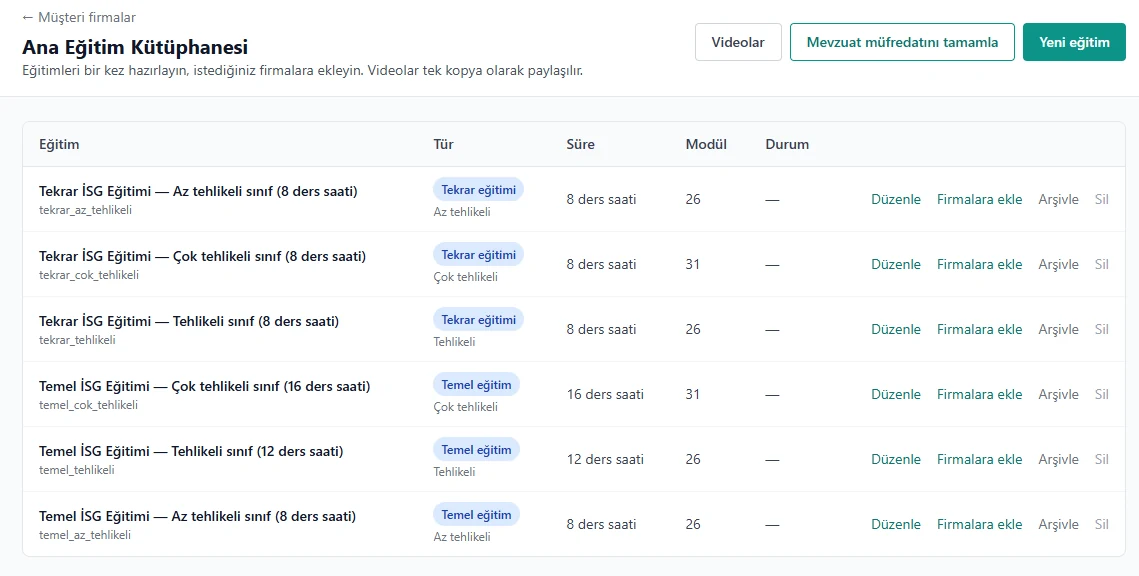
Basic and refresher programs by hazard class in one list; add any of them to a company in one click.
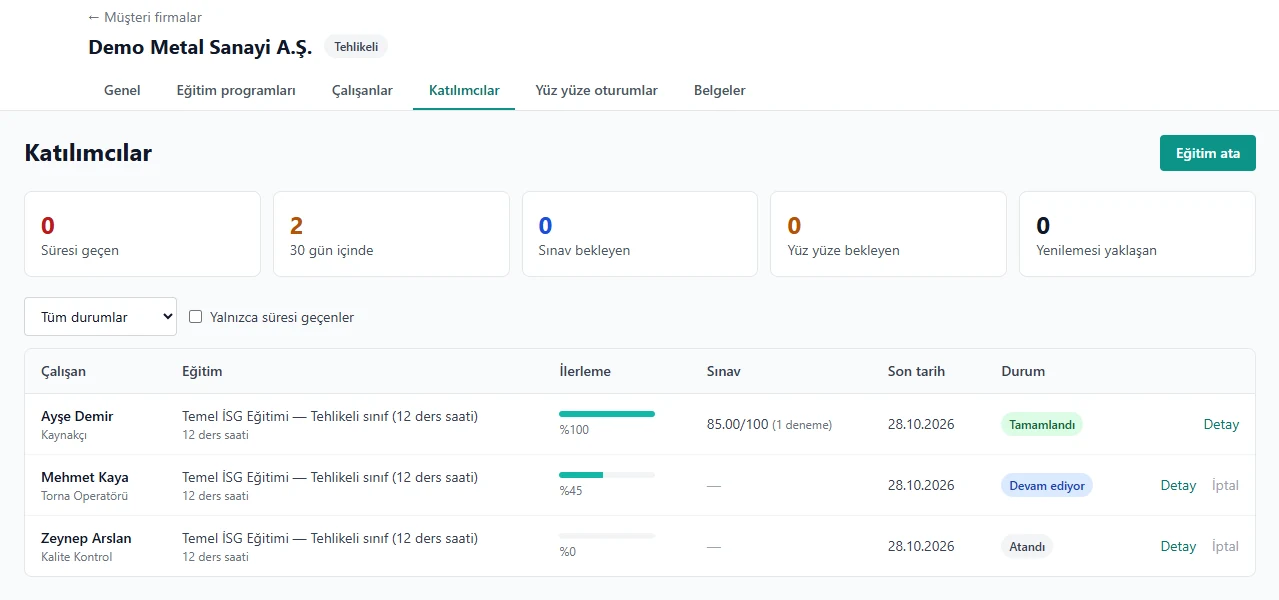
Each employee's progress, exam result, due date and status, with summary counters on top.
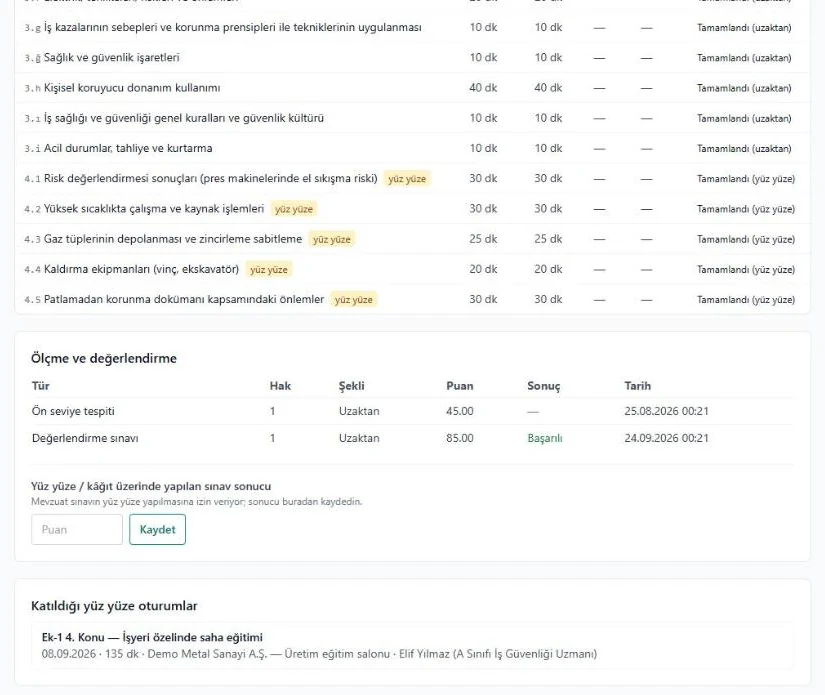
Required and watched time per module, remote / face-to-face marks, pre-assessment and exam results.
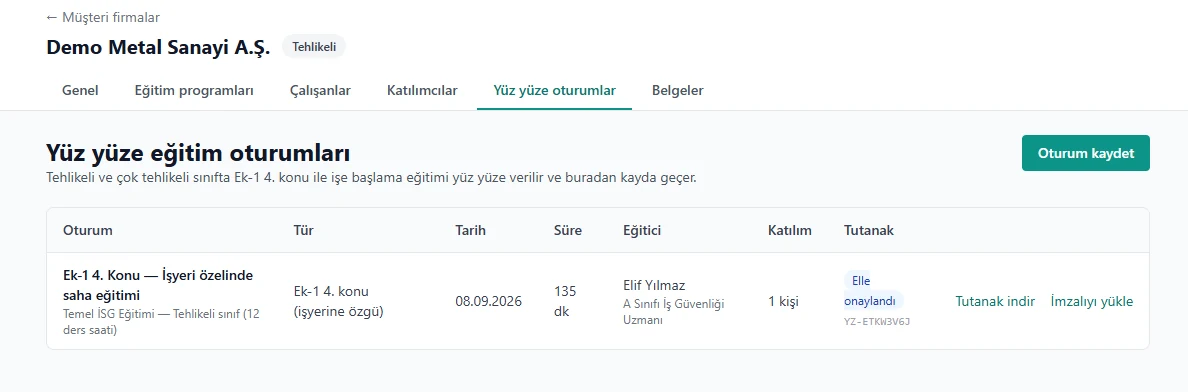
Session type, date, duration, trainer and attendance-sheet status in one row.
Opened, or Actually Watched?
Completion is shown by the system's record. Sessions that meet the defined conditions count towards training time.
Actual Watch Time
Time is computed on the server from play and pause events and stored per module.
Sequential Watching
The video is watched in order from start to finish. It counts as complete once the required watch ratio is reached.
Active Participation Checks
At random intervals the video asks "Are you still watching?". Training continues as the employee confirms; every response is logged.
Tab-Switch Detection
When the employee switches tab or window the video pauses and the event is counted. The allowed number of switches is set per video.
User Activity Log
Every session logs play, pause, tab switches and participation-check responses with timestamps.
Per-Employee Audit Record
One screen per employee: watch time and ratio by module, participation checks, exam attempts and face-to-face sessions attended.
How It Works
A single track from adding the employee to issuing the certificate.
- 1Company & EmployeesSet up the company, import employees
- 2ProgramCurriculum by hazard class
- 3AssignmentWith a due date, manual or by rule
- 4Online TrainingVerified watching
- 5Face-to-FaceRecorded with a signed sheet
- 6Exam & CertificateCertificate and renewal
Hazard-Class Rules Built In
Pick the company's hazard class; basic training duration, face-to-face requirement and refresher period flow into the program automatically.
Make Training Interactive with Live Surveys
Ask the room a question during training and see the answers on screen at once. Training feedback, a knowledge quiz, or marking hazards on a site photo — all from the participant's phone.
Join by Code or QR
Participants scan the QR on screen or type a 6-digit code and join straight from the phone's browser.
7 Question Types
Multiple choice, word cloud, rating, open text, ranking, timed quiz and mark-on-image.
Live Results Screen
The trainer starts a question, opens and closes voting and puts results on screen. Or let participants go at their own pace.
Anonymous by Default
Participation is anonymous, so people answer candidly. Named participation can be switched on if you wish.
Ask the Trainer
Participants send questions from their phones and upvote others'. Open-text answers are moderated before they appear.
Excel & PDF Reports
Each session's results download as Excel and PDF with charts. Run the same survey as separate sessions for different shifts and groups.
A Screen for Every Role
Whoever manages the training, follows the company or takes the course sees only what they need.
Provider Console
Manage multiple companies from one console: programs, videos, assignments, face-to-face sessions and certificates. Training-manager and trainer roles.
Company Panel
The company's HR / OHS contact follows their own employees' progress, maintains the roster and downloads certificates. Sign-in by e-mailed code.
Employee Training Portal
Employees sign in with a one-time code; watch training on phone or computer, take the exam and download their certificate.
Frequently Asked Questions
What is Wisdom Watch Training Management?
It is software for managing OHS training. Training is delivered by your authorised trainers or your service provider; the system plans, tracks and records it.
How do online and face-to-face training work together?
It follows the hazard class. In hazardous and very hazardous workplaces, topics on job- and workplace-specific risks are delivered face to face. The system marks those modules as face-to-face required and completes the training once the session record is verified.
How is video watching verified?
Watch time is computed on the server; the video is watched in order, tab switches are counted and participation is confirmed at random intervals. Sessions that meet the conditions count towards training time. Every event shows in the employee's audit record.
Who prepares the training content?
The program skeleton comes ready with the statutory topic headings. You upload and edit the videos and question bank. Content format is video (MP4, WebM, MOV).
How do employees sign in?
Employees get a one-time code using their national ID, phone or e-mail. It runs in the browser, on phones too.
Which channel are notifications sent on?
Assignment notices, deadline reminders and certificate-ready notices are sent by e-mail.
Where can surveys be used?
Live surveys also work on their own at trainings, meetings and site events. Participants join directly by code or QR.